


AUTODESK REVIT | GENERATIVE AI INTEGRATION
THE STORY:
Autodesk Revit is a leading architectural software known for its ability in creating complex 3D models, architectural visualization, and cross-industry collaboration. Their product constantly evolves through regular updates and new features, as it adapts to emerging technologies and to meet the ever-changing demands of the industry.
As a UX designer and an Architect, I saw the opportunity to intersect innovation and optimize workflows by integrating AI into Autodesk Revit. This case study focuses on integrating generative AI to create family components, aiming to elevate design efficiency for designers, engineers, and all Revit users.
TIMELINE
May 2024 - July 2024
ROLE
-
User Research
-
Interface Design
-
Prototyping
-
User Testing
THE PROBLEM
Creating and finding family components in Revit is time-consuming, limits design variations, and affects overall productivity for designers and architects.
THE SOLUTION
Integrate generative AI technology into Autodesk Revit to automate the creation and customization of family block components.
DESIGN PROCESS
RESEARCH
+ DEFINE
IDEATE +
WIREFRAME
PROTOTYPE
IN FIGMA
USER
TESTING
USER RESEARCH
I kicked off the project by interviewing 8 of my colleagues and class alumni to understand designers' and architects' thoughts on integrating AI into Revit. The interviews were conducted through self-paced questionnaires followed by informal discussions.
Some of the key goals for this research includes:
1. Determine the significant challenges in modeling components in Revit.
2. Explore potential benefits in efficiency and consistency through AI integration.
3. Gauge the willingness of designers to adopt AI tools in their workflows and the relevancy of these tools to their needs.
Targeted Audience
The selected interview participants are experienced designers and architects who
uses Autodesk Revit into their workflows.
Participant requirements include:
1. Minimum 1 year of experience in Revit.
2. Familiarity with creating components.
Interview Questionnaire
Let's get to know you
1: Can you tell me about your role and experience in the design industry?
2: How long have you been using Autodesk Revit?
3: What types of projects do you typically work on?
Let's talk about workflow
4: Can you describe your current workflow for creating family block components in Revit?
5: How often do you model your own family components and how much time do you typically spend on them?
6: What is your process for exploring different design variations of a family component?
7: What are the most challenging aspects of creating family components manually?
Let's dig into AI + Technology
8: Have you used any AI or automation tools in your design work before? If so, how was your experience?
9: How open are you to integrating AI into your current workflow, such as creating family block components?
10: What features would you like to see if you could incorporate AI into your workflow with Revit?
11: Do you have any concerns or reservations about using AI in your design process? If so, what are they?
12: How do you envision AI changing the landscape of architectural and engineering design in the future?
DATA RESULTS
What features would you like to see if you could incorporate AI into your workflow with Revit?
Generative Family Components
Auto Alignments (components & objects)
Auto Alignments (sheets & layouts)
Auto Building Code + Error Detection
Generative Templates and Consistency
Auto Design Solutions (general design)
Auto Design Solutions (sustainability)
33%
21%
20%
13%
5%
5%
3%
How often do you typically find yourself modeling your own Family components in Revit?
Weekly
Few times a week
Few times a Month
Inconsistent (not sure)
Monthly
38%
25%
20%
13%
13%
How much time do you typically spend on modeling your own Family components? (per Family)
Differs case by case
1 to 2 Hours
2 to 5 Hours
1 to 2 Days
Under 1 Hour
38%
25%
13%
13%
13%
PAIN POINTS
Time Consuming
Designers spend hours to days in creating and customizing family components, which reduces overall productivity.
Limited Design Iteration
A lack of preset families and online resources limits the ability to explore variations of a component.
Inconsistent Graphics
Lack of uniformity in graphics and standards across and within projects results in inconsistent style, quality and coherence in components.
PERSONA


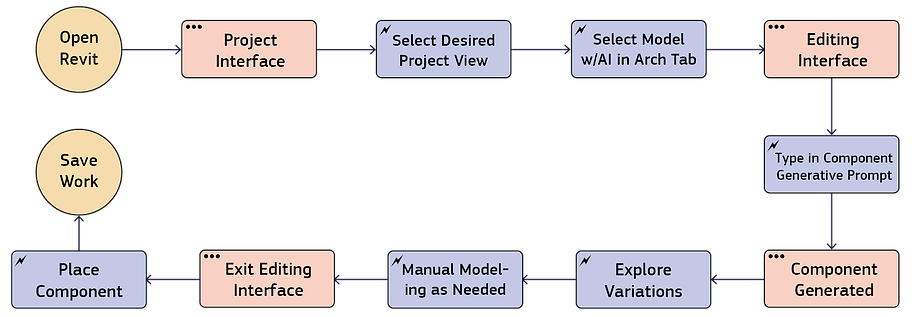
USER FLOW MAP

CASE STUDY
Northumberland Players is a theatre venue currently being designed for renovation and expansion. We have developed a Revit model of the building's current condition, using Revit's preset window components for early project studies. These windows do not accurately reflect the existing structure. As we move into design development, the client has requested replacing the generic windows with arched windows to accurately match the current condition.
Since neither the Revit preset library nor online resources offer this window type, we will need to model it from scratch. Let's explore how might we work this efficiently using AI integration.

SKETCH WIREFRAME
Option 1 Command Flow:
Click "Model with AI" under Architectural Tab > Enter generative prompt > Component generated and ready to be placed > Variations of component under properties. (All in same interface)

Option 2 Command Flow:
Click 'Model with AI' under the Components drop-down menu > A new editing interface opens > Enter generative prompt > Component generated > Variations of the component appear on top edit/modify tabs > Finish model (component ready to be placed)


DIGITAL PROTOTYPE
Prototype designed in Figma, graphics from Adobe Photoshop with screenshots from Revit.

1. Starting point
Begin by opening your Revit model and navigate to your desired project view.
USER TESTING
Testing Methodology:
The tasks are quite simple, it includes participants to open the prototype and follow a step-by-step guide to integrate AI-generated family components into a Revit project. User demographic involved 5 participants, each with a minimum of one year of Revit experience and familiarity with creating components. Each participant performed the tasks at their own desks without monitoring.
Feedback Collection:
Feedback was gathered through post-task surveys followed by informal discussions.
Observations:
All users expressed excitement about the AI integration features, commenting on its potential to speed up workflows and enhance efficiency. Some positive quotes from participants include:
"I can see this feature becoming an essential part of our new workflow.
"The variations are incredibly helpful. It'll save me a lot of time from looking for ideas on Pinterest."
"It takes a lot of time to model components manually. This could be a game changer just having it generated, even just as a base point!"
Challenges:
One user highlighted a valuable challenge regarding the interface transition. They mentioned that switching between selecting 'Model with AI' and the creation interface felt abrupt and suggested it could benefit from a smoother transition to enhance the user experience.
Actionable Insights:
Improve the design by introducing a components category prompt before entering the creation interface. This approach, also used in the conventional 'model in-place' function, will give users the anticipation that they are transitioning into a new workspace.

WHAT'S NEXT?
Refine Prototype: Implement the actionable insight by introducing a components category prompt to smooth out the transition between interfaces.
User Testing: Conduct another round of user testing for further comments.
Other AI Features: Explore other AI capabilities that could further enhance user experience. Examples found during the user research phase include auto-alignment, auto-detection, and auto solutions etc.
CONCLUSION
From the early stages of this case study, it became clear to me that AI is set to be a key part of future architectural software, and I'm confident that Autodesk is already exploring similar innovations behind the scenes. The results from introducing just one feature into Revit have shown immense positive feedback from users, suggesting significant improvements in work efficiency. In conclusion, embracing technology evolution and adapting to AI is essential for enhancing user experiences for Autodesk users in the architectural, engineering, and construction (AEC) industry. Thanks for reading my case study!